In today’s customer-centric business environment, providing quick and accurate answers is essential for effective Helpdesk Support. Customers expect immediate assistance, while support teams need reliable information to resolve queries efficiently. This is where Knowledge Base Management for Helpdesk becomes important. It helps businesses organize, maintain, and share useful information through a centralized knowledge repository. With solutions like ConVox, businesses can strengthen their contact center operations and help support agents access relevant information when they need it.
A well-organized knowledge base is an important component of a modern Help Desk Support Application. It enables agents to find answers to frequently asked questions, troubleshoot common issues, and follow standardized procedures. By integrating knowledge resources with Contact Center Helpdesk Solutions and Helpdesk Software, businesses can improve response consistency, reduce repetitive work, and deliver a better customer experience.
What Is Knowledge Base Management in Helpdesk Support?
Knowledge Base Management is the process of creating, organizing, updating, and maintaining a centralized collection of information that helps customer support teams resolve queries. This information may include frequently asked questions (FAQs), troubleshooting guides, product documentation, standard operating procedures (SOPs), and step-by-step instructions.
In Helpdesk Support, a knowledge base acts as a shared source of information for agents and, where applicable, customers. Instead of searching through old emails, documents, or multiple applications, agents can access relevant information from one place.
Effective Knowledge Base Management for Helpdesk also ensures that information remains accurate and easy to understand. When products, policies, or support processes change, the knowledge base can be updated so agents can provide reliable answers.
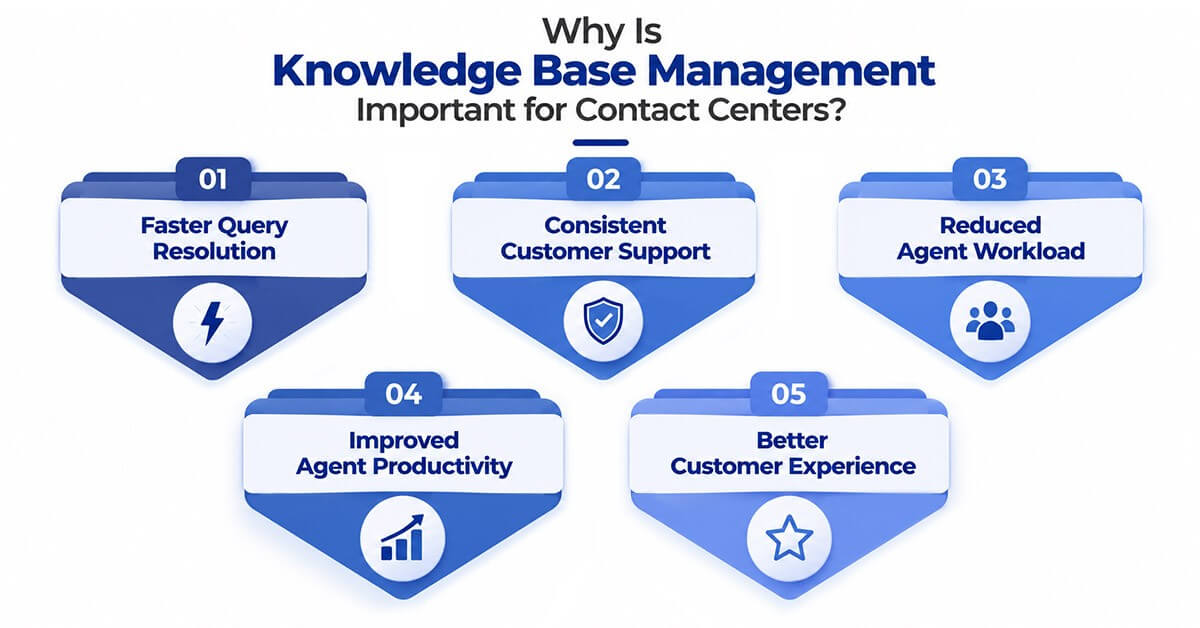
Why Is Knowledge Base Management Important for Contact Centers?
Contact centers handle a wide range of customer queries every day. Without a structured information system, agents may spend valuable time looking for answers or asking colleagues for assistance.
Here are some key reasons why knowledge base management matters:
1. Faster Query Resolution
A centralized knowledge base helps agents locate relevant answers quickly. This reduces the time spent searching for information and can improve overall ticket resolution time.
2. Consistent Customer Support
When agents refer to the same verified information, customers receive more consistent answers across calls, emails, chats, and other support channels.
3. Reduced Agent Workload
Frequently asked questions and common troubleshooting steps can be documented in advance. Agents can use these resources instead of repeatedly solving the same problems from scratch.
4. Improved Agent Productivity
A searchable knowledge repository allows agents to focus on understanding customer concerns rather than spending time locating information.
5. Better Customer Experience
Faster responses, accurate information, and fewer unnecessary transfers can contribute to a smoother customer support experience.
How Does Knowledge Base Management Work in a Helpdesk Application?
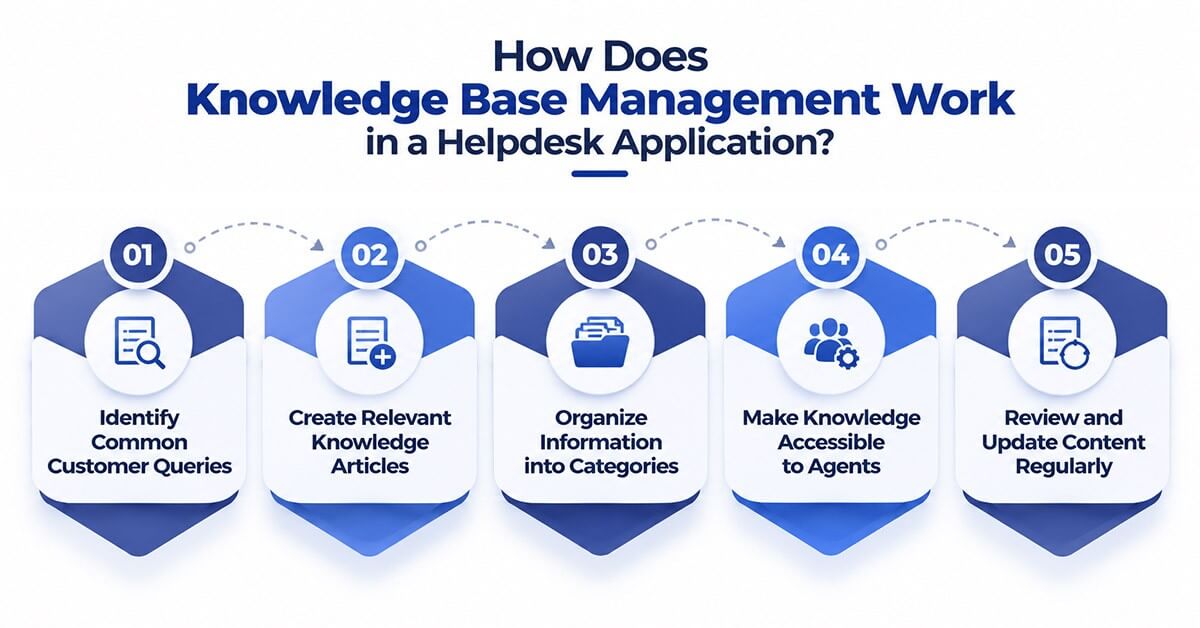 Knowledge Base Management follows a structured process that keeps support information accessible, relevant, and useful.
Step 1: Identify Common Customer Queries
Businesses review support tickets, call records, chat conversations, and customer feedback to identify recurring questions and common issues.
Step 2: Create Relevant Knowledge Articles
Support teams prepare clear articles covering frequently asked questions, troubleshooting procedures, product information, and policy-related queries.
Step 3: Organize Information into Categories
Articles are grouped into relevant categories, such as billing, technical support, account management, and product assistance. Searchable titles and keywords make information easier to locate.
Step 4: Make Knowledge Accessible to Agents
The knowledge base is made available through the organization’s Help Desk Support Application or connected support tools, allowing agents to retrieve relevant information during customer interactions.
Step 5: Review and Update Content Regularly
Support teams monitor article usage, identify outdated information, and update content based on product changes and recurring customer concerns.
This continuous process helps businesses maintain a useful knowledge base that supports day-to-day helpdesk operations.
What Are the Key Features of Effective Knowledge Base Management Software?
An effective knowledge management system should make information easy to create, find, maintain, and use.
Centralized Information Repository
A centralized repository keeps support documentation in one organized location, reducing dependence on scattered files and informal communication.
Search and Categorization
Search functionality, relevant keywords, and structured categories help agents find answers without navigating through numerous documents.
Easy Content Updates
Support teams should be able to revise articles, remove outdated instructions, and publish updated information when processes change.
Access Control and Permissions
Role-based permissions help ensure that employees can access the information appropriate to their responsibilities.
Integration with Helpdesk Software
Integration with ticketing systems and contact center platforms can help agents access relevant knowledge while managing customer requests.
Performance Tracking
Article views, search activity, and feedback can help businesses identify useful resources and uncover information gaps that need attention.
Knowledge Base Management can strengthen Contact Center Helpdesk Solutions by connecting information resources with everyday support workflows.
When agents receive a customer query, they can search for relevant documentation and follow established troubleshooting steps. This is particularly useful when handling complex technical issues, recurring service requests, and queries that require standardized responses.
For example, a customer contacting a telecom provider about an internet connectivity issue may require several troubleshooting steps. A knowledge article can guide the agent through checking connectivity, verifying device settings, and following the appropriate escalation process.
Similarly, a financial services helpdesk can use documented procedures to answer common questions about application access, account verification, and service requests.
By making information accessible at the point of support, businesses can improve workflow efficiency, reduce avoidable escalations, and maintain consistent service standards.
What Is the Difference Between a Knowledge Base and a Helpdesk Ticketing System?
Although they work together, a knowledge base and a ticketing system serve different purposes.
| Feature | Knowledge Base | Helpdesk Ticketing System |
| Primary purpose | Stores and shares information | Tracks and manages support requests |
| Main content | FAQs, guides, procedures, documentation | Customer issues, tickets, status updates |
| Key benefit | Helps users find answers | Helps teams resolve and track issues |
| Typical use | Reference and self-service | Issue assignment and resolution |
| Relationship | Provides information for resolving issues | Uses knowledge resources to support resolution |
When combined, these capabilities can help support teams manage customer requests while accessing the information needed to resolve them efficiently.
How Can ConVox Support Better Helpdesk Management?
ConVox provides contact center and communication solutions designed to help businesses manage customer interactions and support workflows. Its capabilities, including contact center communication and ticketing management, can contribute to a more organized support environment.
When knowledge resources are incorporated into an appropriate helpdesk workflow, support agents can benefit from better access to documented procedures, relevant information, and standardized responses.
For businesses evaluating ConVox or other Contact Center Helpdesk Solutions, it is important to assess how knowledge resources can work alongside ticket management, omnichannel communication, and existing CRM systems.
The right configuration depends on the organization’s requirements, integrations, and available product features. Businesses should confirm specific knowledge base functionality and integration options with their solution provider before implementation.
What Are the Best Practices for Knowledge Base Management?
To get the most value from Knowledge Base Management for Helpdesk, businesses should follow a few practical best practices.
- Use clear and simple language: Write articles that agents can understand and apply quickly.
- Keep content organized: Use meaningful categories, titles, tags, and keywords.
- Prioritize frequently asked questions: Start with recurring customer queries and high-volume support issues.
- Review articles regularly: Assign content owners and establish review schedules to maintain accuracy.
- Use feedback to improve content: Identify articles that are difficult to understand or fail to resolve customer queries.
- Encourage team participation: Allow experienced agents and subject matter experts to contribute useful information.
- Measure effectiveness: Monitor article usage, search success, ticket resolution trends, and customer feedback.
These practices help businesses maintain a reliable knowledge repository that evolves with customer needs and operational requirements.
What Challenges Can Businesses Face Without Knowledge Base Management?
Without a structured knowledge base, support teams may encounter several operational challenges.
Longer resolution times: Agents may need to consult multiple sources before answering a query.
Inconsistent responses: Different agents may provide different instructions for the same issue.
Repeated work: Teams may repeatedly investigate problems that have already been resolved.
Dependence on experienced employees: New agents may struggle when important information exists only in the experience of senior team members.
Outdated information: Without a defined review process, agents may rely on obsolete procedures or incorrect documentation.
A well-maintained knowledge base can help address these challenges by making verified information easier to access and update.
How Should Businesses Choose the Right Helpdesk Software?
Selecting the right Helpdesk Software requires more than comparing features. Businesses should consider how the application supports their agents, customers, and existing workflows.
Before choosing a Help Desk Support Application, evaluate the following factors:
- Ease of use: Can agents find information quickly with minimal training?
- Search capabilities: Does the system support efficient searches and useful categorization?
- Integration options: Can it work with existing CRM, ticketing, and contact center systems?
- Scalability: Can the solution support growing ticket volumes and additional teams?
- Security: Does it provide suitable access controls and information protection?
- Reporting: Can managers assess support performance and identify knowledge gaps?
- Omnichannel compatibility: Can agents access relevant information while assisting customers across supported channels?
A careful evaluation helps organizations choose Helpdesk Software that aligns with their service requirements and long-term operational goals.
Conclusion
Knowledge Base Management is an important part of efficient Helpdesk Support. It enables businesses to organize support information, improve access to verified answers, reduce repetitive work, and help agents handle customer queries more consistently.
When combined with suitable Contact Center Helpdesk Solutions, ticket management, and communication tools, a centralized knowledge repository can support better workflows and a more reliable customer experience.
With ConVox, businesses can explore contact center and ticketing capabilities as part of their broader support strategy. By assessing their knowledge management needs and selecting the right tools and integrations, organizations can build a more structured, efficient, and customer-focused helpdesk operation.
Looking to improve your contact center support workflows? Explore ConVox solutions to understand how contact center communication and ticket management capabilities can support your business requirements.
Product Link – https://www.deepijatel.com/product/